How to Build a Brand Kit Around Your Logo
Your logo is one of the most important parts of your business.
However, it rarely just exists on its own. It’s usually plastered on your website header, printed on your business cards, or woven into your company uniform. And for your branding to work, your logo needs to look and feel at home across all of them.
That’s why it’s important to make your logo design the starting point of all your marketing. Once you have that beautiful foundation, you can expand its visual direction across all your future assets, ensuring you produce materials with the same identity for a cohesive look.
A brand kit makes this process easier by keeping your key brand elements in one place. It gives you a clear reference for creating new materials, so everything stays consistent no matter where your brand appears.
So, how do you go about creating a complete brand kit from your logo? Let’s take a look below.
What is a brand kit?
A brand kit is a collection of the assets and basic guidelines that should be used in order to represent your brand consistently.
It will typically include your:
- Logo: A brand kit must contain your logo files (PNG, JPG, etc.) and logo variations (ex. Full logo, icon-only logo, text-only logo, black color version).
- Color palette: These are the colors you use for your brand. A brand kit will typically include the color codes (HEX, RGB, CMYK, or Pantone) to ensure accuracy when used.
- Typography: These are the specific fonts your brand uses for your headline, body text, logo, etc. It’s best to include your typography system (ex. the size, spacing, styling), especially for different contexts.
- Imagery style: This includes illustration style, photography style, icon style, and other visual elements to ensure all your graphics will remain aligned with your brand. If you have specific icons or mascots, their files must also be included in the brand kit.
- Templates: If you have templates for business cards, Facebook announcement posts, or presentations that can just be edited with the right information each time, it’s best to include them in the brand kit as well.
- Brand voice: Note down the right communication style for your brand, including the right tone, language, slang, or personality.
- Brand guidelines: This is the document of rules that explain how to use your assets correctly. For example, maybe your logo should always be placed on the top left corner for all social media posts, or that your colors should always be red and white (and not just full red or full white).
The brand kit can come in many forms. It could be a shared Google Drive link, a third-party brand kit manager, a downloadable ZIP file, or a PDF. It’s up to you what you find most convenient.
The important thing is that it must be practical to use and accessible. Your whole team (even those who work remotely) plus external partners (like influencers or journalists you work with) should be able to open the kit, download the assets, and understand how it should be used.
Brand kit vs. brand identity vs. brand guidelines
Brand kits, brand identities, and brand guidelines may all sound similar, but they are different things.
| Term | What it means | What it usually contains |
| Brand identity | The overall visual and verbal expression of your brand | Visual identity like your logo, color palette, etc. and your brand voice |
| Brand kit | The file that contains all your approved brand assets | The PNG and JPG files of your logo, the hex code of your color palette, the image file of your brand mascot, etc. |
| Brand guidelines | The instructions for using your brand identity correctly | The proper placement of your logo, if it can be placed on a color background, the correct hierarchy of your typography, etc. |
To put it simply: your brand identity is your brand’s overall personality and look, your brand kit contains your brand assets, and your brand guidelines explain how to use the assets.
Why build a brand kit around your logo?
Your logo is a natural place to start building your brand kit because the logo dictates your visual direction.
Maybe your logo uses soft, rounded lettering and warm colors that make your business feel approachable. Or maybe it uses sharp geometric shapes and a dark blue palette that feels more technical and corporate.
These choices give you clues about what the rest of your brand should look like. It leads you to the right color palette, typography, or illustration style to use whether it’s for an Instagram Reel or for your employee onboarding presentation.
It’s also important to keep in mind that while your logo is your starting point, it doesn’t mean replicating the look of your logo every single time. You just use it as a guide to know which visual elements will look great with it.
Let’s say you use the font Shrikhand for your logo. It doesn’t mean using the same font across all your text. You just use it as a guide – that you can use a clean sans-serif for your body text to balance the blockyness of the font, or lean into the retro and playful vibe of the font using your color palette or art style.
Once you establish your brand identity like this, you can now compile your assets into a brand kit.
And this brand kit then gives you several advantages.
You don’t need to think about which fonts would go together every time you make an Instagram post. Your employee doesn’t need to dig into his emails looking for the most recent logo file. A content creator you work with won’t need to use a pixelated logo she found on the web just because you haven’t provided her with any. This ultimately means all your materials —presentations, flyers, social media ads, website, packaging, videos, merch, blog post— will look like they belong to the same company, no matter where or who made them.
This becomes even more valuable as your business grows. The more people, platforms, and marketing materials you add, the harder it becomes to maintain consistency without a shared reference point. But with a brand kit, you ensure everyone is working on the same page.
How do I create a brand kit from my logo?
Once you have your logo, you’ll just need to build a system around it to create your brand kit.
The system can be in seven parts like this: Logo system + Color palette + Typography + Imagery + Voice + Templates + Rules
Let’s break down each section below.
Step 1: Build a complete logo system
Your logo may look fantastic across the top of your website, but what happens when you need to squeeze it into a tiny rounded Facebook profile picture?
This is why one logo isn’t enough. Ideally, you need to have logo variations to make sure your logo can properly fit into the size or context that you need.
The logo variations you’ll need are:
Primary logo

This is your main logo and the version you will use whenever space allows. It should be the default representation of your brand.
Secondary logo or alternate layout

Create an alternative layout for spaces where your primary logo doesn’t fit.
For example, a wide horizontal logo may need a stacked version for square or narrow layouts. And vice versa.
Simplified logo

You may also need a simplified symbol that can represent your business at very small sizes.
This could be an icon-only version or maybe a lettermark logo version. This is particularly useful for social media avatars, favicons, app icons, watermarks, and other places where your full business name would be difficult to read.
Color variations

Your logo colors may look great when it is on a white background, but what happens if you need to place it on an orange one? That’s why it’s crucial to prepare versions suitable for different backgrounds. At minimum, consider:
- Full-color
- Black
- White
- Single-color
Logo file formats
Aside from logo style variations, you also need to have your logo available in different file formats.
This is because different formats serve different purposes:
| Format | Best used for |
| PNG | Websites, social media, presentations, and transparent backgrounds |
| JPG | Simple digital applications where transparency isn’t required |
| SVG | Websites, signage, print, and applications requiring scalable graphics |
| Printing, sharing, and professional production | |
| EPS | Professional printing and certain design workflows |
Always keep both high-resolution raster files and scalable vector files in your brand kit. This means you won’t have to enlarge a tiny PNG when somebody suddenly needs your logo printed across a three-meter banner.
Step 2: Create logo usage rules
Having the correct logo files only solves half the problem. You also need to explain how they should be used.
Your guidelines should define basics such as:
- Minimum logo size
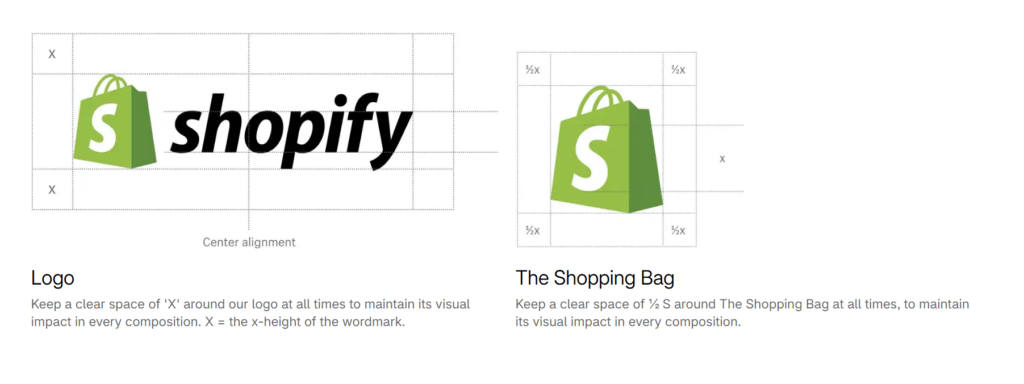
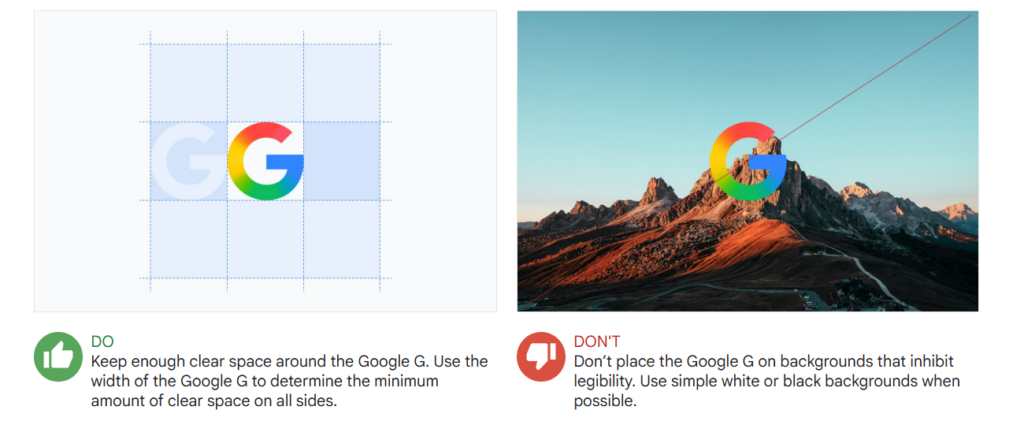
- Clear space around the logo
- Approved background colors
- Variations for light and dark backgrounds
- Preferred placement
- Tagline usage
- Alignment with other elements
- Partner or co-branding placement, if relevant
You don’t necessarily need pages of measurements and diagrams. For a small business, a handful of clear rules may be enough.
It is equally useful to document what not to do. This could be things like:
- Do not stretch, compress, rotate, recolor, or crop your logo.
- Avoid adding unapproved shadows, outlines, or other effects.
- Don’t replace the logo typeface
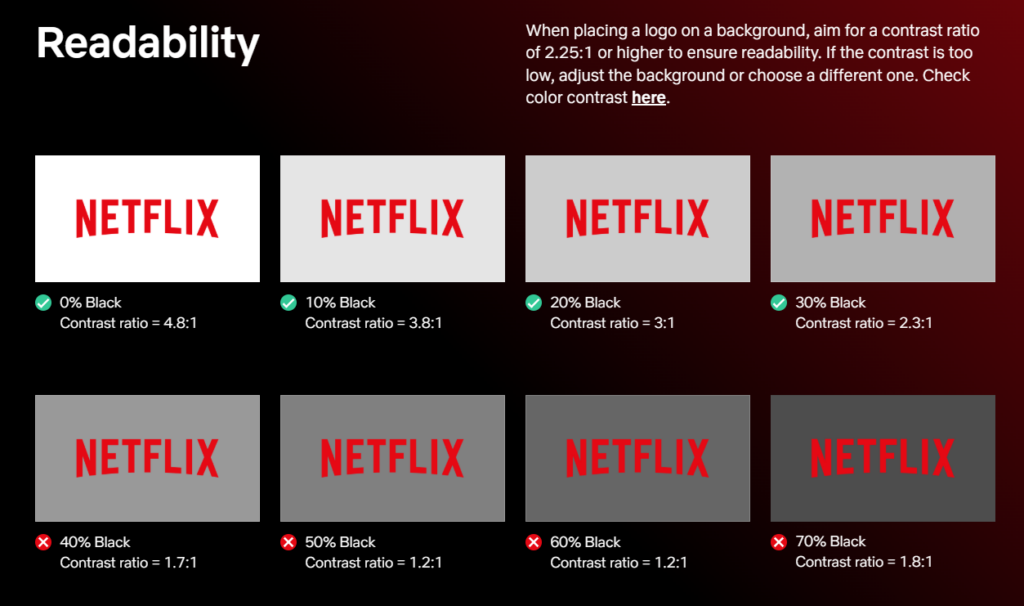
- Don’t place the logo against a background where it becomes difficult to see, or recreate it from a screenshot.
Do’s and don’ts must be present for your other assets like typography or imagery, but you’ll need to be extra detailed when it comes to your logo since it is your most important visual asset.
Some sample logo guidelines are:
Step 3: Build a brand color palette
Your logo colors provide a useful starting point, but your business will usually need more colors than those contained in the logo itself.
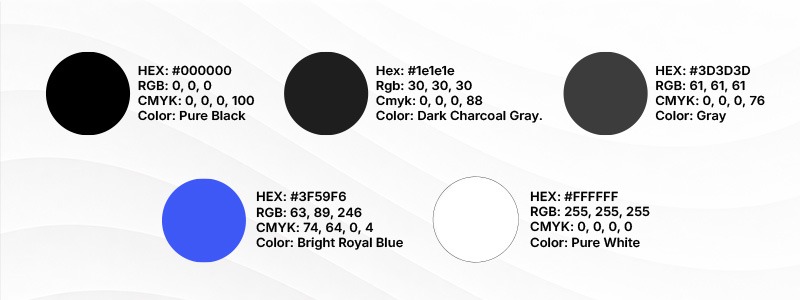
That’s why you should have a brand palette, which contains:
- Primary color: Your most recognizable brand color.
- Secondary color: Supports the primary color and provides variation for your designs.
- Accent color: Highlights buttons, offers, or important information.
- Neutral colors: Used for backgrounds, text, borders, essentially your design’s “breathing room”.
- Functional colors: Used for messages such as success, warning, or error states.
You don’t have to use all the colors every time, nor does every supporting color have to appear inside your logo. What matters is that the palette complements the identity and works across the materials you actually create.
Record your color codes
Don’t rely on descriptions such as “the dark red one.” Having color codes ensures everyone knows the exact color to use.
So make sure you have the following codes in your brand kit:
- HEX for common digital applications
- RGB for screens
- CMYK for print
- Pantone or another spot-color reference if precise print matching is important
Define how your colors are used
Your kit should make it clear which colors dominate layouts, which work as backgrounds, which are appropriate for text, and which should be reserved for accents or calls to action.
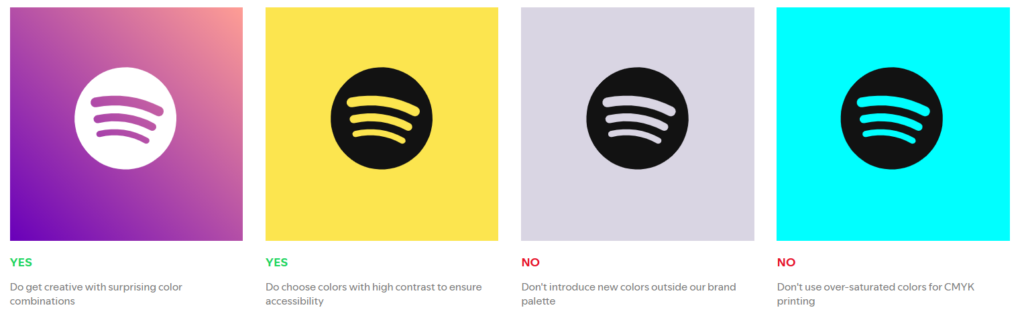
Remember to check accessibility as well. A color that works beautifully in a logo may not provide enough contrast for small text or buttons. Check important text and background combinations against current WCAG contrast requirements rather than assuming every logo color is suitable for every application.
Make sure to also note down dos and don’ts for your colors, to ensure consistency.
Step 4: Choose brand fonts
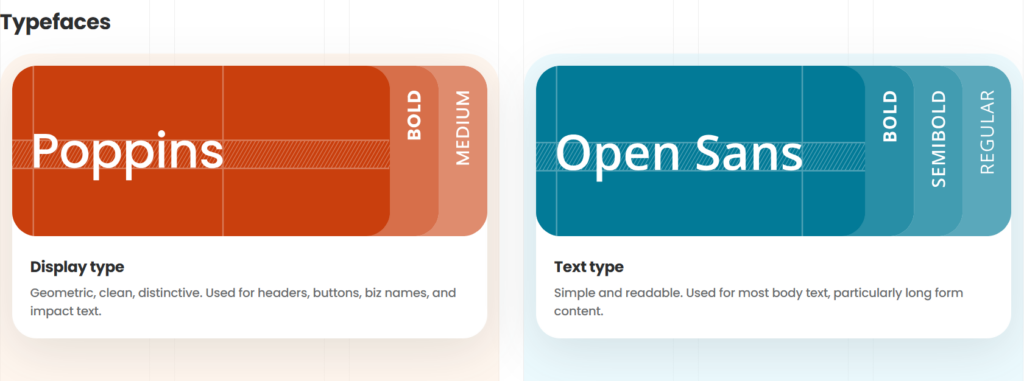
Just like your colors, your typography should have clear roles.
For many small businesses, two font families are enough:
- Heading font: Used for titles and major brand moments
- Body font: Used for longer text and chosen primarily for readability
You can introduce a third accent font if you genuinely need it, but avoid adding fonts just to get more variety or because you found one that looks cool. This is because having too many fonts can just make your brand look confusing or disorganized so it’s best to keep it simple.
Do you have to use your logo font?
Not really. There may be cases where the lettering in your logo is too decorative or intricate to use as body text, or it may be a font that is difficult to install across devices. So don’t feel restricted to using your logo font only.
Instead, look for fonts that complement your logo.
For example, a decorative logo may work better alongside a clean and simple sans-serif body font. A minimalist wordmark could leave more room for an expressive heading typeface elsewhere.
Document your typography rules
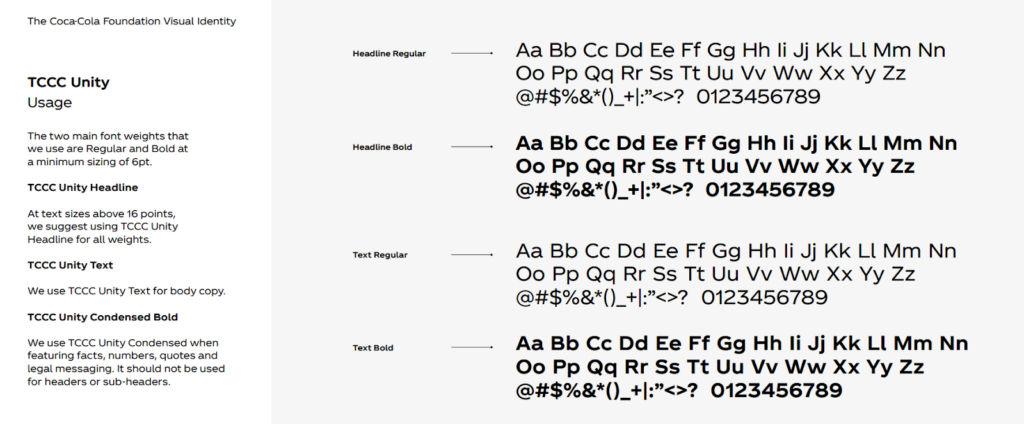
Record details like:
- Font names and legitimate download sources
- Licensing information
- Approved weights
- Heading and body roles
- Suggested sizes
- Line heights
- Letter spacing, where relevant
- Web-safe fallbacks
- Capitalization preferences
- Alignment rules
Step 5: Define your imagery style
Imagine scrolling through a company’s social feed where one post uses a polished studio photograph, the next has a cartoon illustration, the next uses a gritty black-and-white image, and the next contains glossy and bubbly 3D icons.
It’s confusing, right? Even if they have the same logo on each post, the brand would still feel inconsistent.
That’s why your brand kit should also establish an imagery direction.
Photography
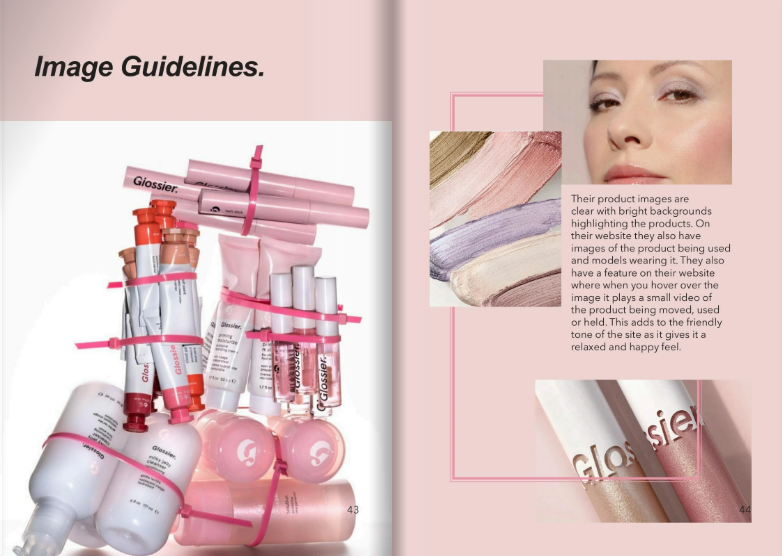
Consider the subject matter, lighting, composition, backgrounds, color temperature, editing, and level of formality you want.
Your instructions could be as simple as: “Use bright, naturally lit photographs showing small business owners actively working. Favor candid, human moments over posed corporate handshakes.”
Try to also include images that fit and don’t fit the brand, so people can have an easier time identifying what you want.
Illustration
If you use illustrations, decide whether they should be geometric or organic, flat or dimensional, detailed or minimal.
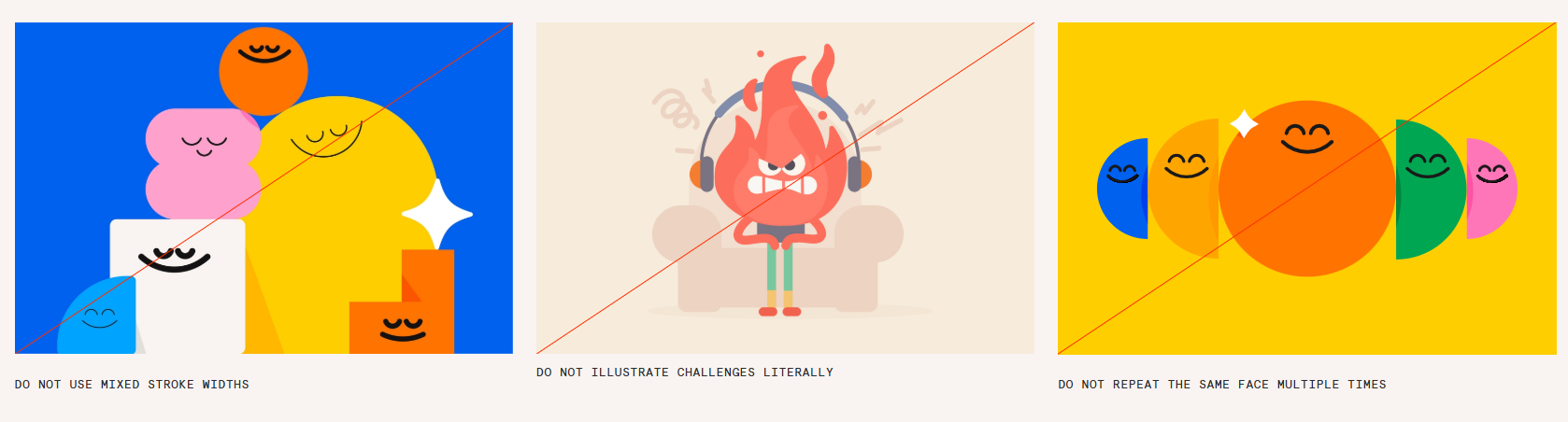
Consider line weight, texture, shapes, characters, and how prominently your brand colors should appear.
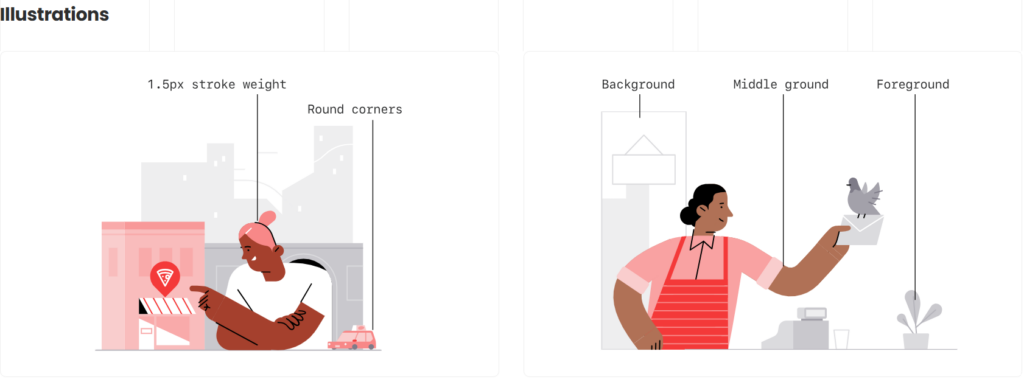
Add rules as well, such as:
Icons
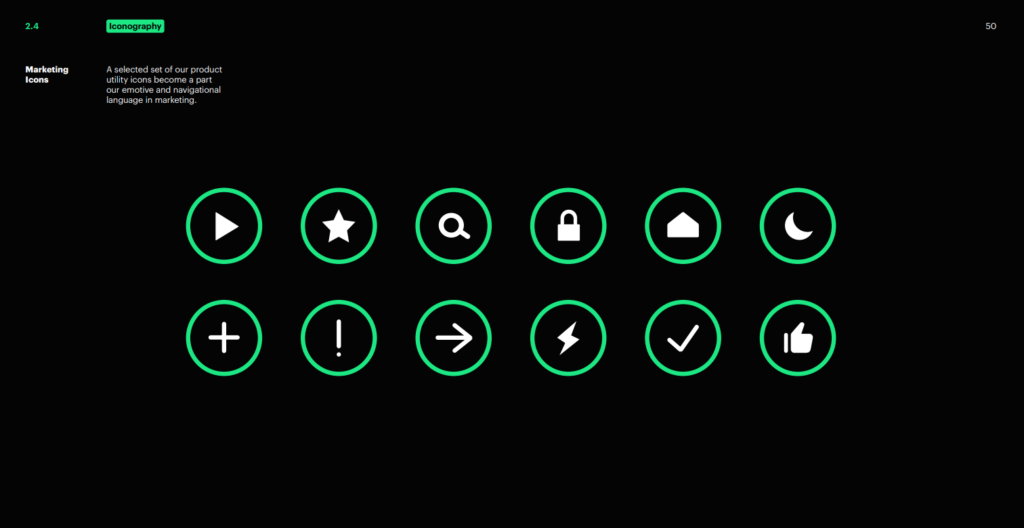
Your icons should also feel like they came from the same set.
Choose whether you use outlined or filled icons and keep details such as stroke thickness, corner shape, level of detail, and color treatment consistent.
Keep in mind that you don’t need to have all of these in your brand. Some brands use only photographs, while others favor cartoonized illustrations. Just set guidelines for the imagery style you use.
Step 6: Define your brand voice
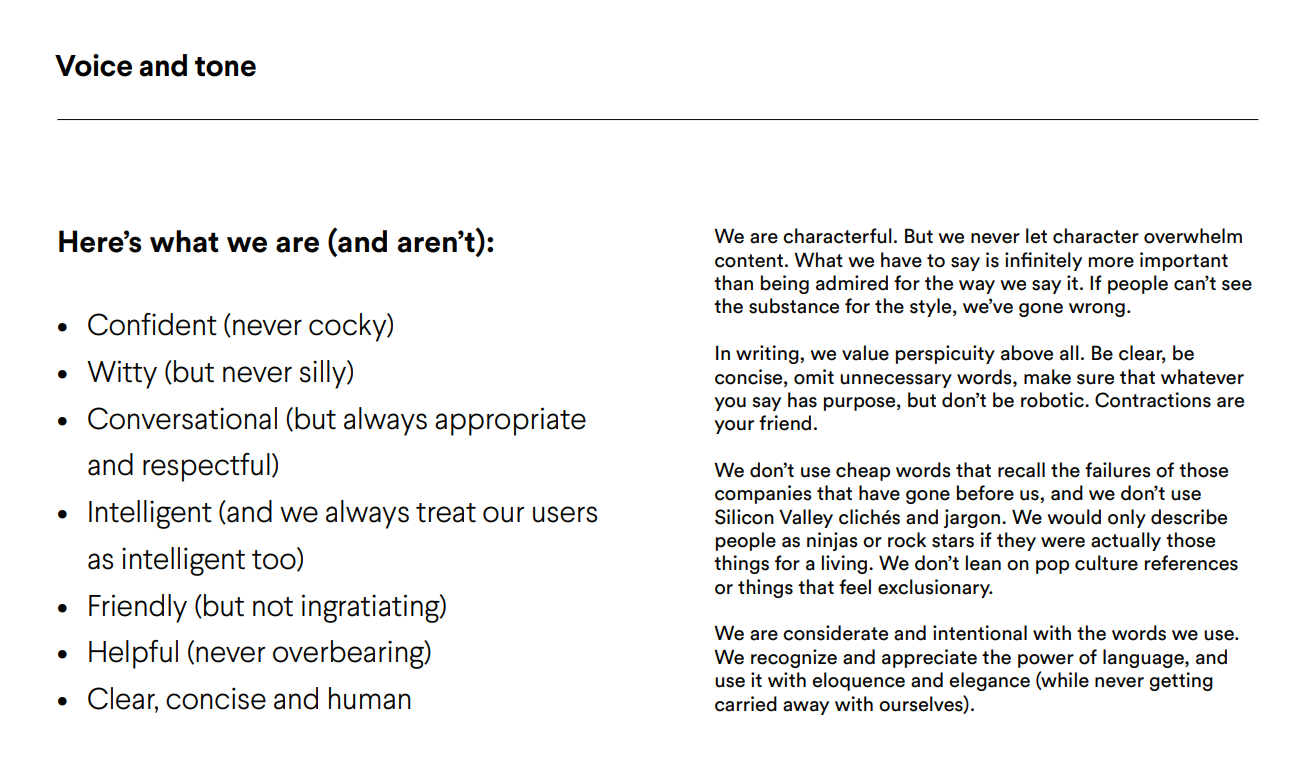
Your brand should sound and look consistent.
Start with three to five voice attributes, but make them specific enough to be useful:
- Friendly, not overly casual.
- Knowledgeable, not academic.
- Confident, not arrogant.
You can then document preferred vocabulary, technical terminology, words to avoid, punctuation and capitalization preferences, and common calls to action.
It’s also helpful to distinguish voice from tone. Your voice is your consistent personality. Your tone changes with the situation. A sales page might be enthusiastic, while a support email should be calm and helpful.
Include a few examples like your writing on a website headline, social caption, CTA, customer email, or support message to show what your voice actually sounds like in practice.
Step 7: Turn your brand kit into reusable templates
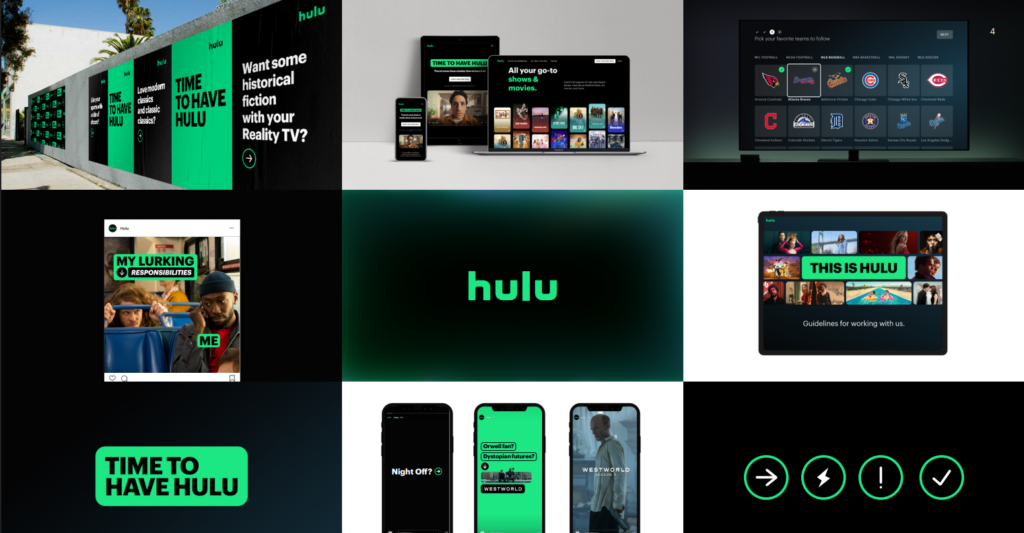
This is where your brand kit starts saving you real time.
Take the rules you’ve established and apply them to the materials your business creates repeatedly.
Depending on your business, this might include:
- Business cards
- Email signatures
- Social posts and stories
- Profile and cover images
- Presentations
- Letterheads
- Proposals and invoices
- Flyers and posters
- Packaging
- Video thumbnails
Each template should already use the correct logo placement, color roles, typography hierarchy, and imagery style. Then you just leave some areas where you can change the information as needed. This ensures you don’t need to create a new asset each time you need it.
Test your templates with realistic content, too. A social template that looks beautiful with “Your headline here” might fall apart when you replace it with an actual 12-word headline.
Step 8: Organize and name your brand files
A beautifully designed brand kit isn’t very useful if nobody can find anything.
Create a simple folder structure such as:
- Logos
- Primary
- Alternate
- Icon
- Full color
- Black
- White
- Colors
- Fonts and licenses
- Photography
- Illustrations and icons
- Templates
- Brand guidelines
- Archived versions
Use descriptive filenames as well. For example, “brand-primary-logo-full-color.svg” is much more useful than “logo-final-FINAL-final2.svg”.
Also include version numbers and last-updated dates where useful and clearly separate archived assets from currently approved ones.
If you regularly work with external agencies, freelancers, printers, or partners, consider creating a separate folder containing only the files they are approved to use.
If possible, assign a member of your team to be responsible for keeping your brand kit updated and correct to ensure you won’t run into any mishaps.
Step 9: Test the brand kit in real applications
Don’t assume your system works because it looks good on a brand board.
Do some tests to see how it looks in real life. Try creating a square social post, a vertical story, a website header, and a mobile layout. Test your logo against a photograph and on a black-and-white printout. Shrink it down to a tiny profile icon and scale it up for an office signage.
As you test, look for problems with logo legibility, color contrast, font readability, visual hierarchy, or layouts that feel too restrictive.
You can also test out your brand kit to somebody who didn’t create it. Ask them to make a simple asset using only the files and instructions you’ve provided. If they immediately start asking which logo to use, what font is correct, or whether they’re allowed to use a certain color, you have found gaps in your kit.
Step 10: Create a one-page brand kit checklist
Think you’re done with everything? You can use this checklist to make sure you’ve covered the essentials.
| Brand kit component | Minimum requirement |
| Brand identity | Audience, positioning, values, personality, visual identity |
| Primary logo | Full-color, master version |
| Logo variation | Horizontal, stacked, icon, color versions |
| Logo guidelines | Clear space, minimum size, backgrounds, and prohibited uses |
| Color palette | Primary, secondary, accent, neutral, and functional colors |
| Color codes | HEX, RGB, CMYK, Pantone |
| Typography | Heading and body fonts with approved weights |
| Imagery | Photography, illustration, and icon direction |
| Brand voice | Voice attributes, tone guidance, and copy examples |
| Templates | Frequently used marketing materials |
| File management | Organized folders, filenames, access, and version information |
Your own kit can be more detailed if you want. But if you are starting out this is a good starting point.
And don’t worry if your brand kit is not as big yet. You can just expand it as your business grows in the future.
Conclusion
A great logo gives your business a recognizable identity. A great brand kit makes that identity usable everywhere else.
You don’t need a hundred-page brand manual to get started. You just need to have a logo, and once you have that, everything follows: the color palette, typography system, imagery, brand voice, and brand guidelines.
Once those pieces are in place, creating new content becomes much easier. Instead of hunting for the right color or thinking of the right icon to use, you can just refer to your brand kit. No need to worry about mismatched graphics or using the wrong files.
This then makes it easy to create a cohesive brand identity, which in turn will make your brand stick to your customers minds. Who knows, you might just be the next Coca-Cola, where just one glimpse of their cursive font reminds everyone of their brand!
Excited to create your brand kit? Head on to our tools here at Design.com such as AI logo generator, AI image generator, or AI background remover to get started.
FAQs
What is a brand kit and what should it include?
A brand kit is a collection of approved assets and instructions used to keep a brand consistent. It typically contains logos and logo variations, brand colors and color codes, typography, imagery guidance, icons, brand voice information, reusable templates, and basic usage rules.
How do I create a brand kit from my logo?
Start by turning your logo into a complete logo system, then build complementary colors, typography, imagery, voice, templates, and usage rules around it. Use the personality and visual direction of the logo as a starting point rather than simply repeating every element contained in it.
What logo variations should a brand kit contain?
It’s best to have a primary logo, secondary logo, simplified brand mark or icon, full-color version, black version, and white version. You may need additional variations depending on where your logo will appear.
How many fonts should I include in a brand kit?
Most small businesses can build a flexible typography system with two font families: one for headings and one for body copy. A third accent font can be added when there is a clear reason for it. But otherwise it’s best to stick to two as too many fonts can make your visual identity look inconsistent.
What is the difference between a brand kit and brand guidelines?
A brand kit contains the approved assets used to represent a brand, while brand guidelines explain how those assets should be used. Small businesses often combine both into a single resource so people can access the files and their usage instructions in one place.
How do I use a brand kit to keep my branding consistent?
Use your brand kit as the default reference whenever you or someone else creates something for your business. Instead of choosing new colors, fonts, logo treatments, and visual styles for every project, start with the approved assets and rules in your kit.